Instant audience feedback
Polling asks the audience a question during a live event and counts the answers as they arrive. Voting works at any audience size. It takes one tap, it needs no microphone and no camera, and it produces something the host can react to on air. The host chooses which polls run, when they open, and whether the audience sees the results.
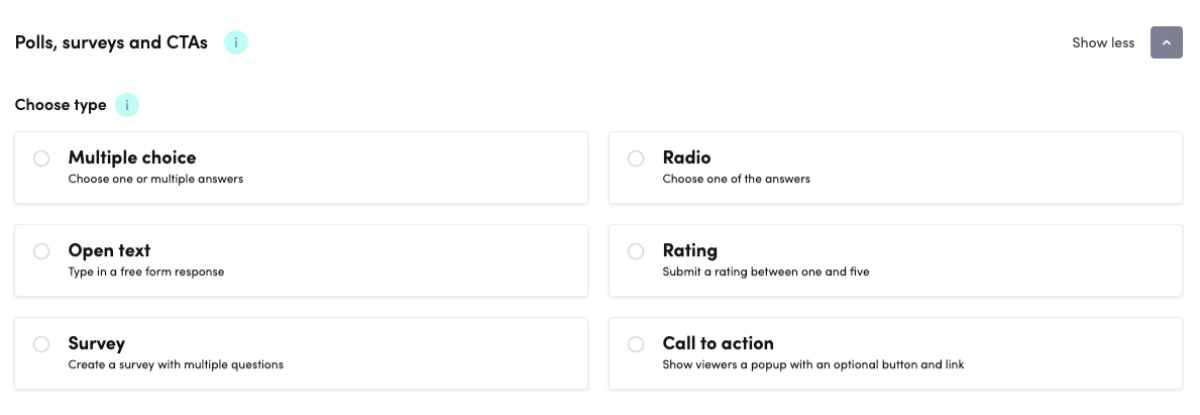
Ask it, time it, and choose who sees the result
Multiple question types
Single choice, multiple choice, rating scales, open text that builds into a live word cloud, multi-question surveys and call-to-action popups.
Real-time results
The poll opens as a popup on the page the audience is already watching. Responses stream in live, and the host either shares the result with the audience or keeps it private.
Timed polls
A time limit and a countdown keep a vote from drifting, and close it when the segment moves on.
Export data
Download the results for further analysis, or pass them into a CRM or analytics tool.
The right format for every question
Each format returns a different kind of answer. Pick the one that matches what you need it for.
Single choice
One answer from a set of options
Multiple choice
Select all that apply
Open text
Free-form answers, rendered as a word cloud that grows as they arrive
Rating
A 1 to 5 or 1 to 10 rating
Survey
Several questions asked as one set
Call to action
A popup with a message and a button to anywhere you choose
The bigger picture
Voting is one step on a wider scale. Videosync also takes written questions, runs a moderated chat, and lets an attendee raise a hand and speak in their own voice. The host decides how far any single event goes.
See the full picture of audience interactivityQuestions about polls and voting
Does the audience see the results?
Only if the host shares them. Results stream in live either way, and the host decides per poll whether the audience sees them or whether they stay private.
Which question formats can a poll use?
Six: single choice, multiple choice, open text, rating, survey and call to action. Open text answers are rendered as a word cloud that updates live as they arrive, a rating runs on a 1 to 5 or 1 to 10 range, a survey asks several questions as one set, and a call to action shows the audience a popup with a message and a button.
Can we get the results out after the event?
Yes. Poll results can be downloaded for further analysis, or passed into a CRM or analytics tool.
See it in action
Get a personalized demo and see how Videosync can work for your organization.