Feel the energy of your audience
Reactions put a tap on screen that says something without interrupting anyone who is speaking. They are the lowest step on the scale of audience participation, and that is the point. An attendee who would never type a question, never open a microphone and never turn on a camera will still tap once when a speaker lands something. That single tap is the difference between an audience the host can read and a silent list of names.
Engagement without interruption
Live emoji bursts
Viewers send reactions that animate across the screen, so a moment that lands is visible while it is still happening.
Curated reaction sets
The host chooses which reactions are available for each event, whether that event is a results webcast or an internal all-hands. Reactions can show on the viewing page for everyone, or stay hidden from the audience and appear only in analytics.
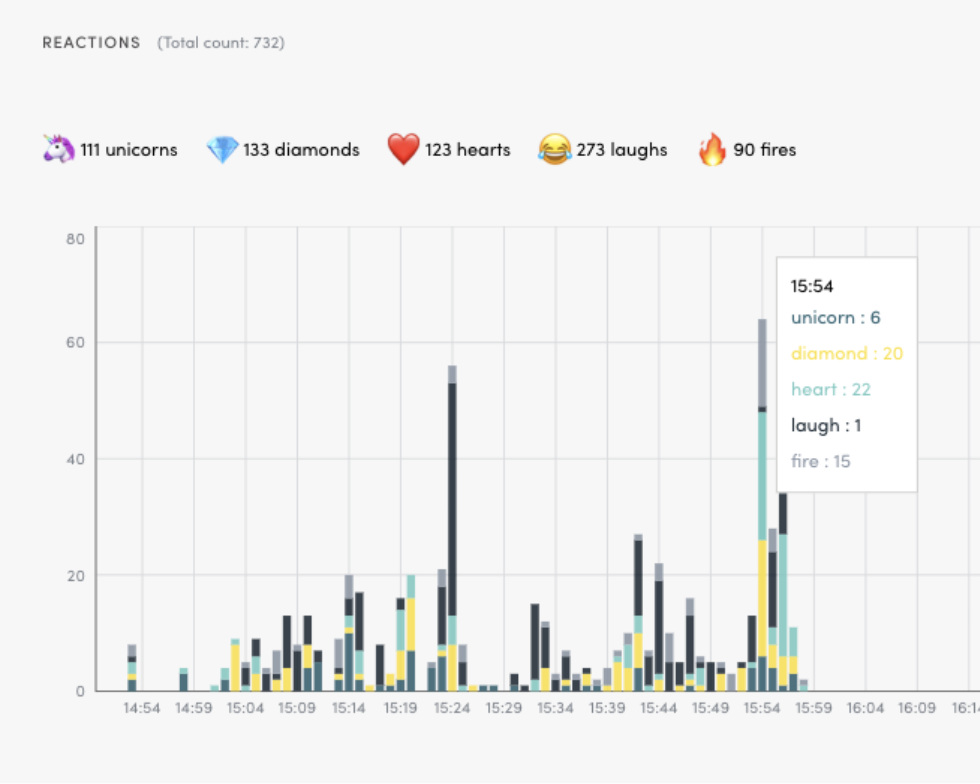
Reaction analytics
Reporting afterwards breaks the reactions down by type, minute by minute, so you can see exactly when the audience responded.
Rate limiting
Automatic cooldowns stop a single viewer flooding the screen, so a reaction still means something.
Real-time pulse of your audience
Reactions give the host something a viewer count never does: a read on how the room is responding, in the moment. When a speaker lands a good point, it shows on screen. Where viewers can see each other's reactions, that feedback works in both directions. The audience sees that other people are there, reacting to the same thing at the same time.
The bigger picture
A reaction is the lightest step on a wider scale. Videosync also takes moderated written questions, runs polls the audience votes in, carries a moderated chat, and lets an attendee raise a hand and speak in their own voice. The host decides how far any single event goes.
See the full picture of audience interactivityQuestions about reactions
Can we choose which reactions the audience gets?
Yes. The host picks the available set for each event, so the audience only ever sees the reactions you chose to offer.
Do reactions have to be visible to the audience?
No. Visibility is a setting per event. Reactions can show on the viewing page so the audience sees what the room is sending, or stay hidden from viewers and be reported only in analytics. The minute-by-minute breakdown comes either way.
Do reactions interrupt the person speaking?
No. Reactions animate across the screen without breaking into the audio or taking the floor from a speaker, which is what separates them from a question or a raised hand.
Can one person spam the screen with reactions?
No. Cooldowns cap how fast any one viewer can send reactions, so what appears on screen reflects the room rather than one person's thumb.
See it in action
Get a personalized demo and see how Videosync can work for your organization.